


Table of Contents
- The Default Experience: What You Get Out of the Box
- Beyond the Basics: Why Custom Templates Matter
- Template Types and Use Cases
- Creating Your First Template: A Step-by-Step Guide
- The Magic Behind Templates: More Than Meets the Eye
- Pro Tips and Best Practices
The Default Experience: What You Get Out of the Box
Let’s start with what Plexral Scribe does straight out of the gate – and trust me, it’s pretty impressive! By default, Scribe takes your dictation and transforms it into a well-structured medical note that:
- Opens with patient demographics and consultation date
- Organizes the history chronologically
- Groups related symptoms and findings
- Creates clear problem lists
- Structures management plans logically
- Maintains medical accuracy while improving readability
Think of it as your basic black T-shirt – it looks good on everyone, but sometimes you want to dress it up a bit.
Beyond the Basics: Why Custom Templates Matter
While the default template is great for routine consultations, we all know that medical practice isn’t one-size-fits-all. Maybe you’re:
- Writing a referral letter to a colleague
- Creating a pre-operative assessment
- Documenting a specific type of follow-up
- Working in a specialty with unique documentation needs
- Just someone who likes their notes structured in a particular way (no judgment here!)
This is where custom templates come in handy – they’re like having a wardrobe full of outfits for different occasions.
Template Types and Use Cases
Let’s look at some common scenarios where custom templates shine:
Referral Letters
Perfect when you need to:
- Highlight the reason for referral upfront
- Summarize relevant history concisely
- Specify urgency
- Include your contact details
Specialty-Specific Templates
Examples include:
- Endocrinology: Prioritizing metabolic parameters
- Cardiology: Focusing on cardiovascular measurements
- Psychiatry: Structured mental state examinations
- Surgery: Pre-op assessment format
Creating Your First Template: A Step-by-Step Guide
Let’s create a basic referral letter template together at scribe.plexrallabs.com.au:
- Log into your dashboard
- Navigate to ‘Templates’ section
- Click ‘Create New Template’
- Name your template (e.g., “Specialist Referral”)
- Add your template structure:
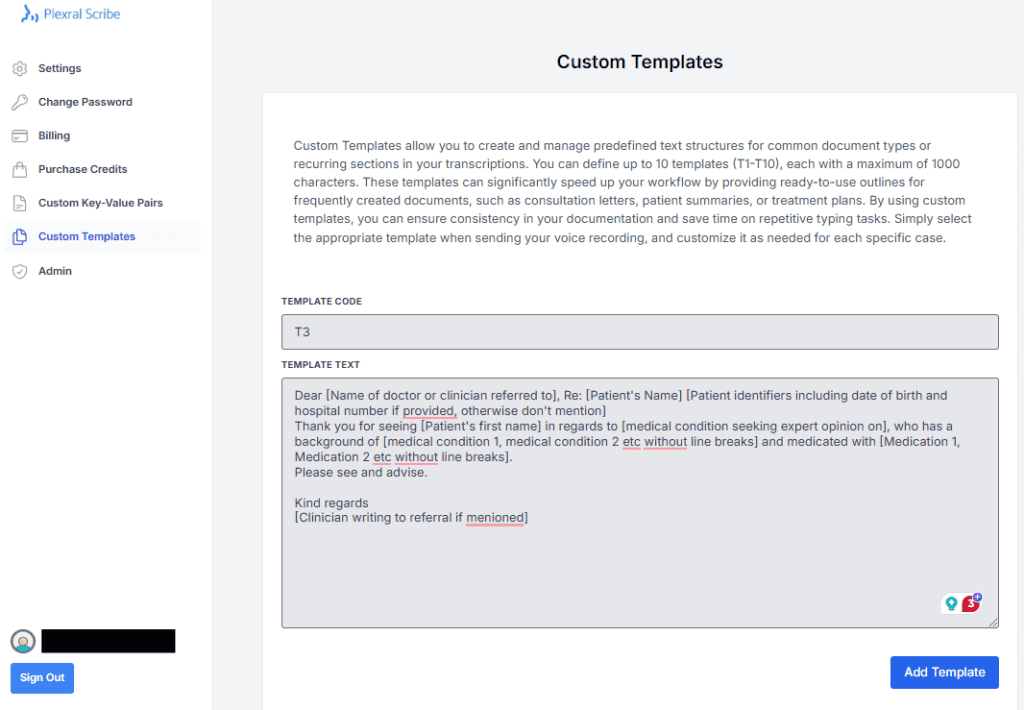
Write a referral letter based on the transcript. Use the following template. Do not make up things.
<template>Dear [Name of doctor or clinician referred to], Re: [Patient's Name] [Patient identifiers including date of birth and hospital number if provided, otherwise don't mention] Thank you for seeing [Patient's first name] in regards to [medical condition seeking expert opinion on], who has a background of [medical condition 1, medical condition 2 etc without line breaks] and medicated with [Medication 1, Medication 2 etc without line breaks]. Please see and advise. Kind regards [Clinician writing to referral if mentioned]</template>
The Magic Behind Templates: More Than Meets the Eye
Here’s where things get really interesting – our templates aren’t just static text replacements. They’re actually sophisticated prompts for our AI engine. This means they can:
- Follow simple instructions (“summarize the last three visits”)
- Perform basic calculations (“calculate BMI from height and weight”)
- Apply conditional formatting (“if diabetes mentioned, include HbA1c”)
- Reorganize information (“list problems in order of urgency”)
For example, you could add instructions like:
[SUMMARIZE_RELEVANT_HISTORY: Focus on cardiovascular and metabolic issues, limit to last 12 months]Pro Tips and Best Practices
- Start simple, then iterate
- Test your templates with various types of dictations
- Use clear, consistent variable names
- Keep a library of your most-used templates
- Share templates with colleagues (yes, you can do that!)
Remember, the goal isn’t to create the perfect template on your first try. It’s about making your documentation workflow more efficient and consistent over time.
Need inspiration? We’ve got a growing library of community-shared templates you can use as starting points. Because why reinvent the wheel when you can customize someone else’s really good wheel?
The beauty of Plexral Scribe’s template system is that it grows with you. Start with the basics, and as you get more comfortable, explore the more advanced features. Your future self will thank you for the time invested in setting up these templates!
Comments are closed